
TLS Tunnel
Screenshots
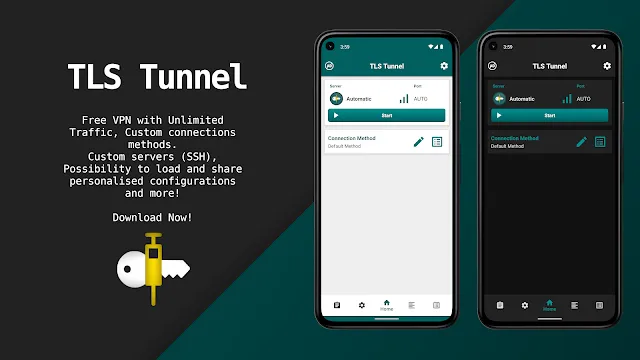
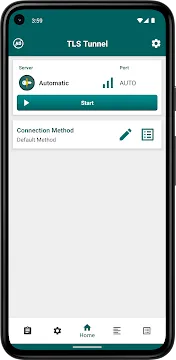
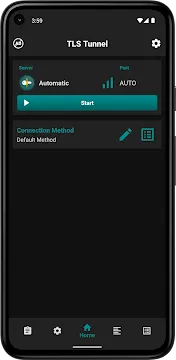
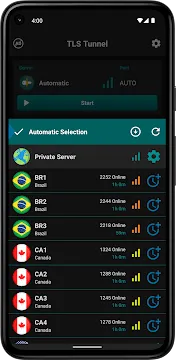
TLS Tunnel helps mobile users secure their personal internet connections and bypass strict network restrictions easily. This advanced software application uses customized protocols to shield your private online data from external observation. Many individuals choose this powerful tool to access restricted websites and services without paying expensive monthly fees.
Moreover, this security application functions perfectly without requiring any personal registration or tedious account creation procedures. Users can simply open the connection interface and select high-speed secure servers instantly. As a result, you enjoy complete digital privacy and online freedom while browsing your favorite websites.
What is TLS Tunnel and How It Works
To clarify, TLS Tunnel establishes a highly secure and encrypted connection between your device and a remote server. The application utilizes a unique proprietary data protocol called TLSVPN to protect all incoming and outgoing traffic. Therefore, your local internet service provider cannot monitor your online activities or block your essential applications.
In other words, this system encapsulates your standard internet traffic inside an advanced, secure cryptographic protection layer. This critical layer relies heavily on modern TLS 1.3 encryption standards to prevent unauthorized data interception. Consequently, malicious actors and network sniffers cannot read your transmitted information even on unsecure public networks.
Why Web Censorship Demands Better Tools
Many strict governments and local network administrators restrict access to specific digital platforms and websites routinely. They deploy advanced firewalls to block popular social media applications and international news channels completely. However, modern citizens require completely open access to global information for their daily work and education.
For instance, local network providers frequently block essential communication tools in academic institutions and corporate workplaces. Standard web proxy tools often fail to bypass these sophisticated deep packet inspection systems. Consequently, smart users turn to specialized tunneling applications to restore their regular internet freedom instantly.
Key Features of TLS Tunnel For Android
This modern application provides multiple robust options for both casual internet browsers and advanced network engineers. You can select the official high-performance servers or customize your own private connection setups easily. Furthermore, the clean user interface neatly groups all primary functions into a single convenient drop-down menu.
Most importantly, the dedicated development team updates the application regularly to improve data speeds and stability. Users can modify specific internal parameters to adapt the connection to their local network environment perfectly. In short, these flexible technical options give you absolute control over your mobile data routing.
Proprietary TLSVPN Security Protocol
- Firstly, the tool utilizes a highly optimized custom security protocol called TLSVPN for official connections.
- Secondly, this advanced protocol implements strict TLS 1.3 cryptographic standards to shield your personal data.
- Further, it effectively prevents dangerous man-in-the-middle attacks by verifying every single server connection automatically.
- As a result, you browse the open internet safely without worrying about identity theft or data leakage.
- Moreover, this custom layout keeps your communication completely invisible to local network monitoring tools.
Private SSH Server Support
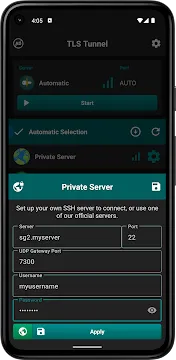
- For example, advanced technical users can connect the application to their own private SSH servers easily.
- This feature supports standard secure shell communication via port 22 for maximum network flexibility.
- But remember, private SSH servers route standard TCP traffic by default unless you manually configure gateways.
- Therefore, network experts can easily manage their own independent data routing systems across the world.
- In addition, you retain complete administrative ownership over the secure servers you connect with.
Custom SNI and Header Adjustment
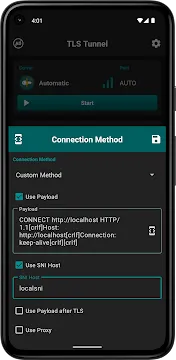
- To clarify, you can set a custom Server Name Indication parameter to bypass host restrictions.
- Users can modify custom connection text and request headers to match local network rules perfectly.
- Moreover, this custom option allows you to exchange essential contacts with the server without detection.
- Consequently, you bypass strict network blocks that standard security tools cannot penetrate successfully.
- Likewise, this precise setting helps you avoid arbitrary blocks imposed by corporate network administrators.
Full IPv6 Traffic Support
- Above all, the official application servers handle modern IPv6 network routing flawlessly for faster speeds.
- This next-generation connectivity ensures more reliable data transfers across modern mobile infrastructure setups.
- Meanwhile, the tool automatically manages both older IPv4 and newer IPv6 communication channels together.
- In other words, you get future-proof performance on any modern network connection you encounter.
- Further, this modern routing protocol reduces unexpected disconnection errors during intensive online tasks.
Battery Optimization and Always-On Mode
- Certainly, the engineering team designed the internal processing engine to consume very low background battery life.
- You can enable the native Always-On VPN feature in your system settings for continuous protection.
- Subsequently, the application maintains a secure cryptographic tunnel 24/7 without draining your battery resources.
- In short, you remain fully protected during long browsing sessions without experiencing device performance drops.
- Additionally, this light processing footprint prevents your mobile device from overheating during extended connection periods.
Understanding Protocol Customization
Customizing your network configuration parameters allows you to overcome the most aggressive internet censorship filters. The application handles multiple diverse traffic protocols including TCP, UDP, ICMP, and IGMP smoothly. Therefore, you can customize the application behavior to match your precise digital communication requirements perfectly.
In addition, users can select different connection methods depending on their current physical network environment. For instance, you can switch easily from official high-speed servers to a custom payload text configuration. As a result, the application adapts dynamically to changing firewall policies across different geographical regions.
The Role of Custom Configuration Files
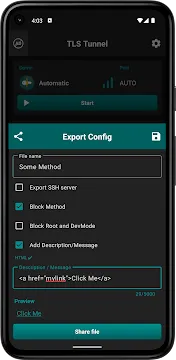
Experienced users can export their optimized connection settings into separate files with the unique dot tls extension. These configuration files save all your custom parameters except for DNS settings and local choices. Moreover, you can add a custom text message for other people who import your specific file.
Furthermore, the application allows you to lock the exported configuration file completely before sharing it. This protective locking mechanism prevents other users from viewing or editing your secret network payload details. Consequently, network managers can share functional configurations with their online communities safely and efficiently.
How to Download and Install TLS Tunnel APK
Installing TLS Tunnel on your mobile device requires only a few straightforward steps. You must follow the instructions carefully to ensure a successful configuration and optimal performance.
- Firstly, open your preferred secure web browser application on your mobile device.
- Secondly, navigate directly to our trusted and verified application download platform page.
- Carefully locate the prominent and secure application download section on the screen.
- Click the download button to save the fresh installation file to your device storage.
- Meanwhile, open the native security settings menu on your mobile operating system.
- Enable the specific option to allow applications from unknown sources temporarily.
- After that, open your default file manager application and locate the downloaded file.
- Tap the installation file gently to initiate the automated system installation wizard.
- Follow the on-screen prompts carefully and grant the necessary network connection permissions.
- Finally, launch the application from your main app drawer and enjoy secure browsing.
TLS Tunnel App Tips and Tricks
You can maximize your connection speeds and protect your personal data by using smart operational practices. These helpful tips will significantly improve your overall experience with this powerful security tool.
- Select the automatic server option to discover the fastest connection node instantly.
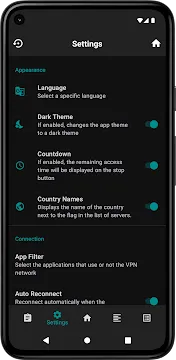
- Monitor the connection countdown timer regularly within the main notification dashboard.
- Renew your active session time early to prevent sudden network disconnections during important tasks.
- Activate the internal IP exposure feature only when communicating with trusted local network peers.
- Configure a stable UDP gateway to reduce latency during intensive online mobile gaming sessions.
Conclusion
To sum up, this specialized security tool provides an excellent method for bypassing internet censorship and protecting online data. The custom encryption systems and flexible settings satisfy both casual browsers and expert network administrators perfectly. Furthermore, you receive all these premium features without paying expensive subscription fees or completing registration forms.
In conclusion, you can download the application today to reclaim your complete internet privacy and digital freedom. The active development cycle ensures continuous bug fixes and excellent performance across all mobile networks. Therefore, this tool remains a top choice for secure, unrestricted web browsing across the globe.